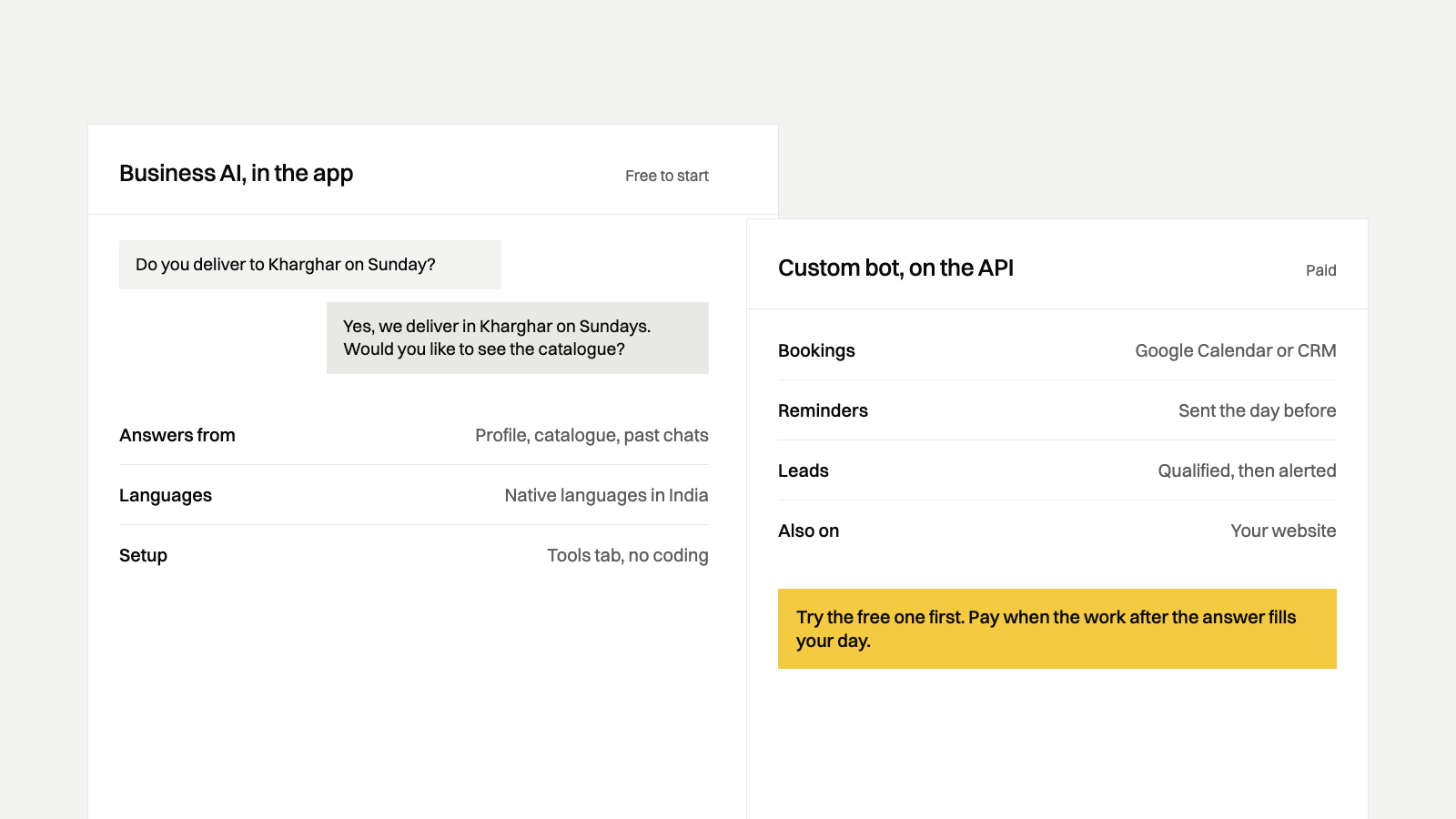
In May 2026 Meta put an AI agent, which it calls Business AI, inside the free WhatsApp Business app for small businesses in India. It answers customers around the clock from your profile and catalogue, and Meta says getting started is free. If most of your chats are the same questions about prices, timings and stock, set it up first. Pay for a custom bot when the answers have to reach your calendar or CRM, or when reminders and follow-ups have to go out on a schedule.
Who should use the free Business AI, and who needs a custom bot?
The free Business AI is likely enough if:
- You run the business from the WhatsApp Business app on one phone.
- Your catalogue, price list and profile already answer most of what customers ask.
- A person can confirm bookings by hand, and you don't need the chat recorded anywhere else.
A custom bot is worth a look if:
- Bookings have to land in Google Calendar or a CRM without anyone retyping them.
- Customers need a reminder the day before, and someone sends those one by one today.
- Every lead has to answer the same qualifying questions before a salesperson calls.
- You want the same bot on WhatsApp and on your website.
What does WhatsApp Business AI do, according to Meta?
Meta's newsroom post introducing Business AI for small businesses in India lists these features:
- It answers customer queries 24/7, including questions about products, services, pricing, discounts and shipping.
- It captures leads, books appointments and recommends products.
- It answers from what the business has already added to its profile and catalogue.
- It is available in all native languages in India, in Meta's words.
- It needs no coding or third-party tools. You set it up in the app from the Tools tab, under Your Business AI.
- The owner can take over a conversation, reply directly at any time, change how the AI works, or turn it off entirely.
Business Today reported the launch on 7 May 2026 and listed the same features. Both say the agent will soon take payments by UPI inside the chat. Neither gives a date.
Meta uses two names. The India post calls it Business AI, and for setup help it links to a Meta page called Meta Business Agent on WhatsApp. That page and WhatsApp's own product page describe the same agent in the WhatsApp Business app with more detail. It learns from your Facebook Page, past chats and website, and you can upload catalogues or price lists. If you don't like an answer, you rewrite it and the agent uses your version from then on. You can give it instructions on tone, choose whether it replies to everyone, only new customers or customers who came from your ads, and flag topics it must always hand to you. Meta's 3 June 2026 post adds a morning briefing on the chats you missed overnight.
What does it cost?
Meta's India announcement doesn't mention a price. Meta's 3 June 2026 post says getting started with the agent is free, and that in the coming months businesses will use it through paid subscription offerings. We couldn't find a subscription price on Meta's pages when we checked on 15 November 2026. Plan on free for now, and expect a fee later.
The paid WhatsApp Business API works differently. There, Meta bills replies written by its own agent as a separate category, at $2.00 per million tokens. Replies from a third-party AI or a person are ordinary service messages. Our post on WhatsApp Business API pricing in India has the rupee rates for every category.
What doesn't Meta say about Business AI?
These are gaps in what Meta has published, as of 15 November 2026. They are not limits we have proved. Check them in the app before you rely on the agent for any of them.
- Where bookings go. Meta says the agent books appointments. Neither the India announcement nor the product pages say whether a booking reaches Google Calendar or any other calendar, or stays in the chat.
- Connections to Google Sheets, a CRM or billing software. The pages we read don't mention any for the agent in the app. Meta's separate Business Agent Platform connects to systems like Shopify and Zendesk, and Meta describes it as infrastructure for enterprises.
- Scheduled messages. Meta describes the agent replying to customers who write to you. Its pages don't mention it sending a reminder the day before an appointment, or following up with a lead who went quiet.
- Who is eligible. Meta says Indian businesses must meet certain criteria and doesn't publish them. The product page adds that some features may not yet be available to every eligible business.
We also looked for a WhatsApp Help Center article on Business AI and didn't find one.
How does Business AI compare with a custom bot?
The left column is what Meta has published. The right column is what KodeThat's two WhatsApp plans include, from our pricing page.
| Topic | Business AI in the WhatsApp Business app | Custom bot from KodeThat |
|---|---|---|
| Setup | In the app, under Tools, with guided steps and no coding. | We build it. AI Chatbot goes live in about two weeks. |
| Cost | Free to start, per Meta. A paid subscription is planned, with no price published. | AI Chatbot: ₹30,000* + ₹3,000*/mo. WhatsApp Automation Pro: ₹60,000* + ₹5,000*/mo. Meta's message charges apply on the API. |
| Languages | All native languages in India, in Meta's words. Meta doesn't list them. | English, Hindi and Marathi. |
| Where bookings go | Meta says it books appointments. It doesn't say where the booking is stored. | With WhatsApp Automation Pro, into your Google Calendar or CRM. |
| Calendar, Sheets and CRM | Not mentioned for the agent in the app. | WhatsApp Automation Pro connects to your CRM and Google Calendar. Links to Google Sheets and other tools are a business automation project. |
| Scheduled reminders | Not mentioned. Meta describes it replying to customers who message you. | WhatsApp Automation Pro sends reminders and follow-up sequences through the API, as Meta template messages. |
| Who controls the answers | You, through Meta's settings: rewrite answers, set the tone, pick who it replies to and flag topics to hand over. Meta runs the AI. | You decide what the bot knows and when it hands over. We build the flows on a third-party AI model and tune the replies every month. |
| Where it works | The WhatsApp Business app. Meta says the agent also works on Messenger. | The WhatsApp Business API and a chat widget on your website. |
Try the free one first
Business AI costs nothing to start, so try it before you pay anyone, including us.
- Update the WhatsApp Business app and fill in your profile: hours, address and a plain description of what you sell. Meta says the agent answers from your profile and catalogue.
- Add your catalogue with prices. If you sell services, upload a price list or a page of your common questions and answers.
- Open the Tools tab and look for Your Business AI. Newer Meta pages call it Meta Business Agent. If neither is there, your account may not be eligible yet.
- Start with replies to new customers only, so your regulars still reach a person.
- Flag the topics it must hand to you, such as refunds, complaints, medical questions and custom quotes.
- Message the business from a personal phone. Ask your ten most common questions, in each language your customers use, and rewrite every answer that is wrong.
- Read its chats every evening for two weeks. Note what it answered, what it handed to you and what it got wrong.
If the answers hold up and nobody is retyping bookings, stop there. You don't need a custom bot. To bring more customers into the chat, put a WhatsApp link on your Instagram bio and Google profile with our WhatsApp link generator.
When does a custom bot pay off?
The free agent answers questions. A custom bot earns its fee when the work after the answer fills your day: bookings retyped into a calendar, reminders sent one by one every evening, and lead details copied into a CRM by hand.
Our AI chatbot and WhatsApp automation work has two plans. AI Chatbot is ₹30,000* + ₹3,000*/mo. It answers on WhatsApp and your website in English, Hindi and Marathi, captures leads with instant alerts and hands a chat to a person whenever needed. WhatsApp Automation Pro is ₹60,000* + ₹5,000*/mo and adds lead qualification, appointment booking, follow-up sequences and reminders, CRM and Google Calendar links, and broadcasts to opted-in customers.
Weigh the setup fee against the hours your staff spend each week retyping bookings and sending reminders. If that is an hour a week, the free agent and a notebook are cheaper. Ravi takes the first call and can tell you which side of that line your business is on.
Questions people ask
Is WhatsApp Business AI free?
Meta's 3 June 2026 post says getting started with the agent is free, and that in the coming months businesses will reach it through paid subscriptions. Meta's India announcement doesn't mention a price, and we couldn't find a published subscription price on Meta's pages on 15 November 2026.
How do I turn on Business AI in the WhatsApp Business app?
Open the Tools tab in the WhatsApp Business app, choose Your Business AI and follow the guided steps. Meta says Indian businesses must meet certain criteria to be eligible and that it is rolling the feature out to eligible businesses. It doesn't publish the criteria, so if the option isn't there, your account may not be eligible yet.
Can WhatsApp Business AI reply in Hindi or Marathi?
Meta says Business AI is available in all native languages in India. It doesn't list them, so test it in the languages your customers write in before you let it answer everyone.
Can I stop the AI and reply to a customer myself?
Yes. Meta says you can take over any conversation from the AI, reply directly at any time, change how it works or turn it off entirely. You can also flag topics that it should always hand to you.
Is Business AI the same as a chatbot on the WhatsApp Business API?
Not quite. Business AI is the agent inside the free WhatsApp Business app. On the paid API, Meta bills replies from its own agent per token, while a bot built on another AI model, like the AI Chatbot plan from KodeThat, is billed at Meta's service message rate.
Where these facts come from
- What Business AI does, its languages, the setup path, the takeover and off switch, eligibility and UPI coming soon: Meta's newsroom post introducing Business AI on WhatsApp for small businesses in India, checked 15 November 2026.
- The 7 May 2026 launch date and the same feature list: Business Today's report on the launch, checked 15 November 2026.
- The Meta Business Agent name, setup in the app and learning from past chats, a website or a catalogue: Meta's page on Meta Business Agent on WhatsApp, linked from the India post, checked 15 November 2026.
- Rewriting answers, tone, choosing who it replies to, topics to hand over, select markets and features not yet available to everyone: WhatsApp's product page for Meta Business Agent, checked 15 November 2026.
- Free to start, paid subscriptions coming, appointment booking, the morning briefing and the Business Agent Platform: WhatsApp's 3 June 2026 post introducing Meta Business Agent, checked 15 November 2026.
- The Meta Business Agent rate on the API and third-party AI replies counting as service messages: Meta's WhatsApp pricing documentation, checked 15 November 2026.
- KodeThat plan prices and what each plan includes: our pricing page and service page.