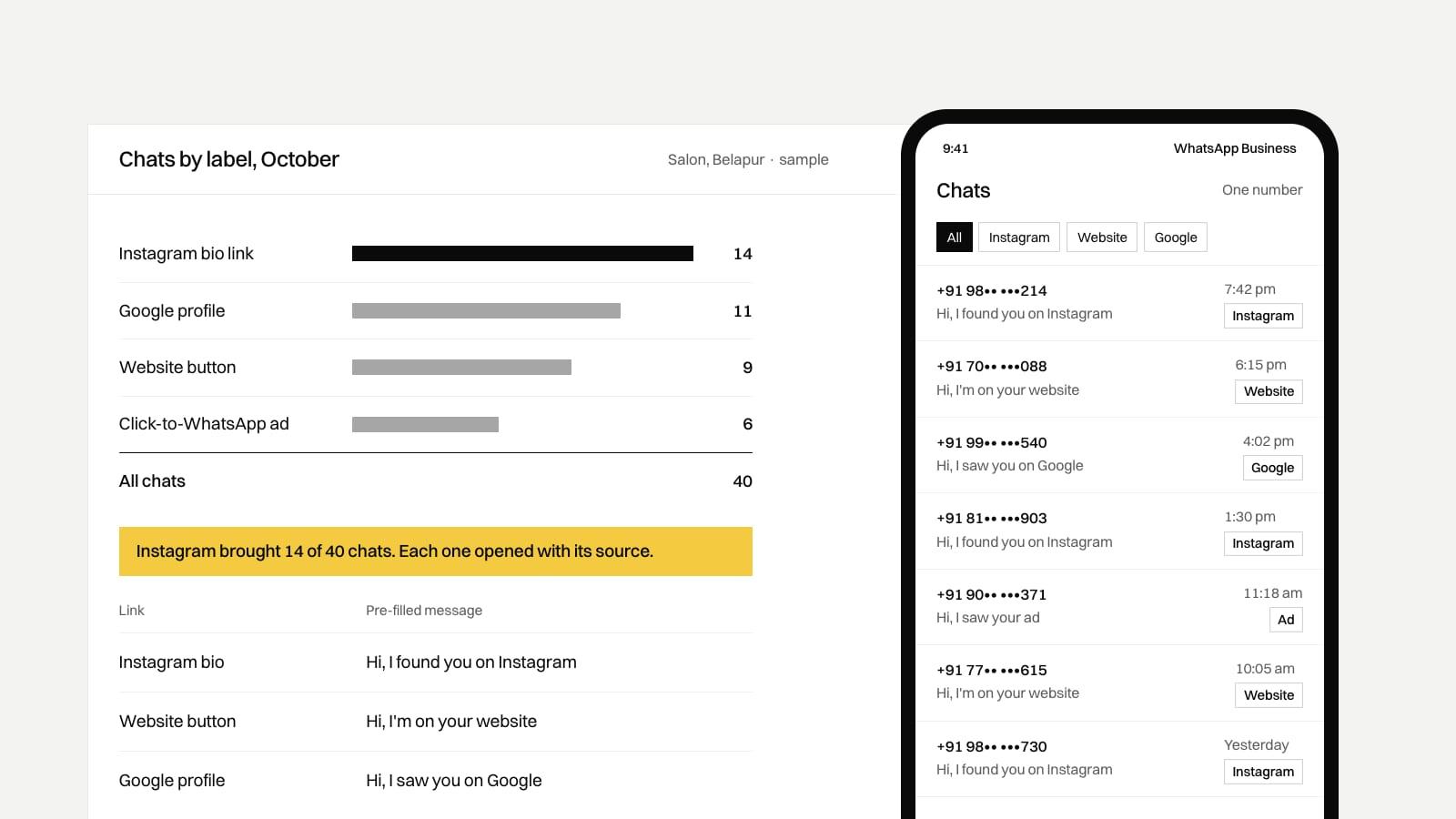
Make WhatsApp the one inbox. Connect your WhatsApp Business number to your Instagram professional account, put a wa.me link with a pre-filled message in your bio and on every page of your website, and send Meta ads to WhatsApp instead of to a form. Each source then arrives as a chat on one number, and the pre-filled text tells you where it came from.
Why does it matter where enquiries land?
In a typical small business, enquiries come in four ways. Instagram DMs land on whoever has the Instagram login. WhatsApp chats land on the owner's phone. Website form emails go to an inbox nobody opens on Saturday, and lead forms from ads sit inside Meta. Four inboxes means slow replies, and nobody can tell which channel brings the paying customers.
One inbox fixes the speed problem. A bit of tagging fixes the second one, and none of it needs custom software to start.
How do you connect Instagram to WhatsApp?
Switch Instagram to a professional account first, either business or creator. Instagram's help centre says you can add WhatsApp to an Instagram business account to give customers another way to reach you. You add your WhatsApp Business number in the professional account's settings.
Keep DMs open too. Some people will always message on Instagram, so someone has to check it at set times and move the conversation to WhatsApp when it turns into an order or a booking.
What should the link in your bio point to?
Instagram lets you add a website in the bio from Edit profile. You have two good choices.
A wa.me link straight to WhatsApp
WhatsApp's help page gives the format: wa.me followed by your full number in international format, with no zeroes, brackets or dashes, so 91 and the ten digits for an Indian mobile. Add
?text=and a URL-encoded message to pre-fill the chat. This is the shortest path for a salon, a tiffin service or a clinic, where the customer just wants to ask a question.A page on your own website
One page with your WhatsApp button, phone number, location and three or four services or products. Use this when people need to see a menu, a price list or your work before they message. Because it's your page, your own analytics count the visits, which a third-party link page may not share with you.
Give every source its own pre-filled message. The bio link says "Hi, I found you on Instagram", the website button says "Hi, I'm on your website", and the Google profile link says something else again. The customer can edit the text, and some will, but most just press send, and every chat starts with its source. Add a WhatsApp label for each source and a month later you can count them.
How do ads that click to WhatsApp work?
Meta's developer documentation describes them plainly: they send people who click your ad straight into a WhatsApp conversation with your business. They run on Facebook and Instagram, and the guide assumes a Facebook Page with your WhatsApp number linked. You set WhatsApp as the ad's destination and promote your business number.
If you're on the WhatsApp Business API, these ads come with a cost rule worth knowing. When someone messages you from one of these ads and you reply within 24 hours, Meta opens a free entry point window that can stay open for up to 7 days, and messages you send in it aren't charged. The window only applies to people who tap the ad on Android or iOS. Our post on WhatsApp Business API pricing in India covers the rest of Meta's rates.
We haven't run a test comparing click-to-WhatsApp ads with lead form ads for the same business, so we can't give you a cost per lead for either. Measure your own: the first month's chats against the ad spend.
What about Meta lead forms?
Meta's help centre describes lead ads with an Instant Form as a way to collect details from people who may be interested in your business. Their name, email and phone may already be filled in if they have given them to Meta. The leads stay on Meta until you fetch them. Meta's help page says you have 90 days from the time someone submits a form to download their details, after which the lead expires. You can download them as CSV or XLS, or connect the form to a CRM.
A lead form is the right choice when you need details before you call back, such as a budget or a site address for an interior job. If you use one, download the leads every week or connect them to a CRM, and message each lead on WhatsApp the same day, so the conversation still ends up in the one inbox.
How does the website feed the same inbox?
| Setup | What the customer does | What you need |
|---|---|---|
| WhatsApp button | Taps it and sends the pre-filled message | A wa.me link with its own text. Free with the Business app. |
| Form with a WhatsApp alert | Fills in a form, and the details reach your team on WhatsApp | The WhatsApp Business API and a developer to connect the form |
| Form to email | Fills in a form, and you get an email | Nothing new, but it lands in a second inbox |
Keep a form for people who don't want to chat, and say under it what you'll do with their number. The DPDP Rules, notified in November 2025, require a standalone, plain consent notice that explains the purpose for which personal data is collected, with an 18-month phased timeline to comply. "We'll use this number to reply to your enquiry on WhatsApp or by phone" next to the form's button is a start. Ask a lawyer about anything beyond replying to the enquiry.
Our take
For a single-location business in Navi Mumbai, Ravi would set up the free WhatsApp Business app on one number, link it to Instagram, and put source-tagged wa.me links in the bio, on the website and on the Google profile. That's an afternoon of work and costs nothing. Skip the old advice about social share buttons and Instagram feeds embedded on the website. They load extra scripts that slow the page, and a share or a like doesn't put a chat in your inbox.
Move to the API when the app stops coping: several people need to answer from the same number, or you want automatic replies and bookings outside office hours. That's where our AI chatbot and WhatsApp automation work starts, at ₹30,000* + ₹3,000*/mo. If you want help being found in the first place, read our guide to getting found locally in Navi Mumbai.
Where these numbers come from
- Adding WhatsApp to an Instagram business account: Instagram Help Center, connect your Instagram and WhatsApp accounts, checked 3 November 2026.
- The wa.me format and pre-filled messages: WhatsApp Help Center, how to use click to chat, checked 3 November 2026.
- What ads that click to WhatsApp do and the linked Page requirement: Meta for Developers, ads that click to WhatsApp, checked 3 November 2026.
- The free entry point window of up to 7 days, opened by a reply within 24 hours: Meta for Developers, WhatsApp Business Platform pricing, checked 3 November 2026.
- What Instant Forms do and the pre-filled contact details: Meta Business Help Center, about Instant Forms, checked 3 November 2026.
- Leads expiring 90 days after submission, and the CSV or XLS download: Meta Business Help Center, download your leads, checked 3 November 2026.
- The DPDP Rules' consent notice and 18-month timeline: Press Information Bureau release of 14 November 2025, checked 3 November 2026.