Before a small business website goes live, check five things. Google must be allowed to crawl it. Every page needs its own title and description. The pages must pass Core Web Vitals, which now use INP. LocalBusiness schema should carry your name and address. Your Google Business Profile must match the site. On launch day, verify the site in Search Console and submit the sitemap.
This is the list we run before a site goes live. It assumes a new or rebuilt site for a local business, a shop, a clinic or a service company that serves Navi Mumbai or one city. Ranking for national keywords is a different job and isn't covered here.
Can Google crawl and index the site?
The staging block is gone
Developers often hide a site under construction with a noindex tag or a robots.txt rule that blocks everything. That's correct before launch and a disaster after it. Open the live robots.txt and view the source of the home page, and check that neither still says "noindex" or "Disallow: /".
A sitemap lists every real page
The sitemap.xml should list the pages you want found and nothing else: no test pages, no thank-you page, no duplicate addresses with and without www. Keep its address in robots.txt so crawlers can find it.
Old addresses redirect
If the new site replaces an old one, list every old address that had traffic or links and redirect each one with a 301 to its closest new page. Skipping this throws away whatever the old site had earned in search.
HTTPS everywhere
Every page should load over https, and the http and www versions should redirect to one address. Free certificates from Let's Encrypt cover this, and most hosts set them up for you.
Does each page say what it is?
One title and one description per page
Write a different title for each page with the service and the area in it, such as "Dental implants in Kharghar", and keep it near 60 characters. The meta description should say what the page offers and why to click, in about 150 characters. Google may rewrite either one, but a clear original is what it starts from.
One h1, then headings in order
Each page gets one main heading that matches its topic, with h2 and h3 headings below it in order. Screen readers use the same structure, so it helps visitors as well as search engines.
A page for each service you want to be found for
A single "Services" page listing ten treatments will struggle to rank for any one of them. Give the main services their own pages with real detail: what it is, who it suits, the price or starting price, and how long it takes.
Alt text on images that carry meaning
Describe the image in plain words ("Front of the clinic on Sector 12 main road"). Decorative images get empty alt text so screen readers skip them.
Do the pages pass Core Web Vitals?
Core Web Vitals are Google's three measures of how a page feels to load and use. On 12 March 2024 Interaction to Next Paint (INP) replaced First Input Delay (FID) as the responsiveness measure. Older checklists that still mention FID are out of date. These are the thresholds Google calls good.
| Measure | What it checks | Good is |
|---|---|---|
| Largest Contentful Paint (LCP) | How long the main content takes to appear | 2.5 seconds or less |
| Interaction to Next Paint (INP) | How quickly the page responds to taps and clicks, across the whole visit | 200 milliseconds or less |
| Cumulative Layout Shift (CLS) | How much the layout jumps while it loads | 0.1 or less |
Google judges each measure at the 75th percentile of real visits, with phones and desktops scored separately. A brand-new site has no real-visit data yet, so before launch you work from lab tests in PageSpeed Insights or Lighthouse on the phone setting. INP problems usually come from heavy scripts: chat widgets, several tracking tags, sliders and page builders. Remove what you don't need before launch, when it's easiest. Our post on mobile-first design explains why the phone score is the one to watch.
Is the schema markup right?
Schema markup is structured data in the page code that tells Google facts about the business. For a local business that means LocalBusiness markup, or a more specific type such as Dentist or Restaurant, usually written as JSON-LD. Google requires only name and address. It recommends telephone, url, geo coordinates, opening hours and priceRange, and we fill in all of them when we know them.
Google recommends the review and rating properties only for sites that publish reviews of other businesses, so don't mark up your own star rating. The schema must match what the page and your Business Profile say, down to the phone number. Test every page with Google's Rich Results Test before launch.
Do the local signals match?
Google Business Profile
Google says local results depend on relevance, distance and prominence, and that "there's no way to request or pay for a better local ranking." Complete and accurate information helps. Pick the most specific primary category, fill in hours, services and attributes, and add the new website address. Google also says more reviews and positive ratings can help, so ask happy customers for one, with a direct link.
Name, address and phone, written the same way
Use exactly the same business name, address and phone number on the site, the Business Profile, the schema and directory listings such as Justdial or IndiaMART. Pick one spelling of the locality (Sector 20, Kharghar) and stick to it everywhere.
A contact page with a map
Put the full address, a map, the timings and the phone number on the contact page, and the phone number in the header of every page.
What do you do in Search Console on launch day?
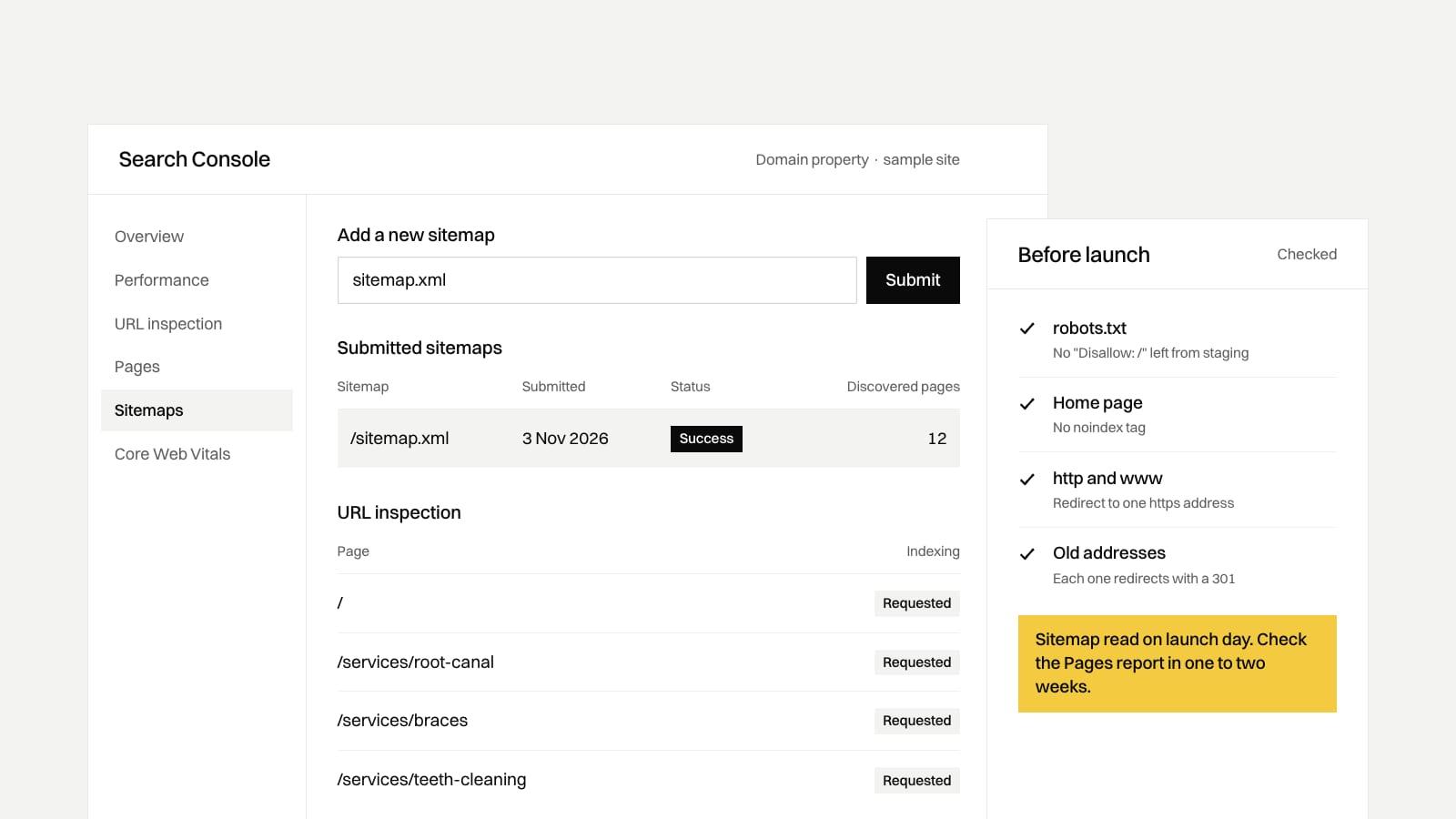
- Add the site as a Domain property. It covers the www and non-www versions and every subdomain, and Google verifies it with a DNS record at your domain registrar.
- Submit the sitemap under Sitemaps.
- Inspect the home page and the main service pages with URL Inspection, and request indexing.
- Come back after a week or two. Read the Pages report to see what was left out and why, and fix anything marked as an error.
Search Console then becomes part of routine upkeep, which our post on website maintenance costs covers.
Our take
In our view, for a shop or clinic in Navi Mumbai, the Google Business Profile will bring more calls in the first months than the website's own rankings. Ravi would set up or clean up the profile in the same week the site launches and link the two, before spending anything on blog posts or link building. We'd skip paid link packages entirely.
On our plans, the Starter website (₹25,000*) includes basic SEO setup. The Growth website (₹60,000*) adds advanced SEO and schema markup. Ongoing local SEO and Business Profile work is a separate service, described on our local SEO and ads page.
Where these numbers come from
We checked every source on 3 November 2026.
- INP replacing FID on 12 March 2024: web.dev, INP becomes a Core Web Vital on March 12.
- LCP, INP and CLS thresholds and the 75th percentile rule: web.dev, Web Vitals.
- LocalBusiness required and recommended properties, and the Rich Results Test: Google Search Central, local business structured data.
- Local ranking factors and paid ranking: Google Business Profile Help, how to improve your local ranking.
- Domain properties and DNS verification: Search Console Help, add a website property.